Current ai writing tools updates in 2026 center on the transition from generic text generation to context-aware, production-ready synthesis. For infrastructure architects and engineering leads, the challenge lies in integrating these models into existing workflows without compromising data security or introducing latency. This manual examines the operational mechanics of current generation assistants, focusing on token efficiency, model grounding, and the specific architectural requirements for deploying these systems at scale.
Quick Decision Matrix
Selecting the right assistant depends on your specific environment. Use this matrix to align your infrastructure needs with model capabilities: LLMs with high context windows are preferred for codebases, while specialized agents are better for documentation and compliance tasks.
Architectural Foundations of AI Writing Systems
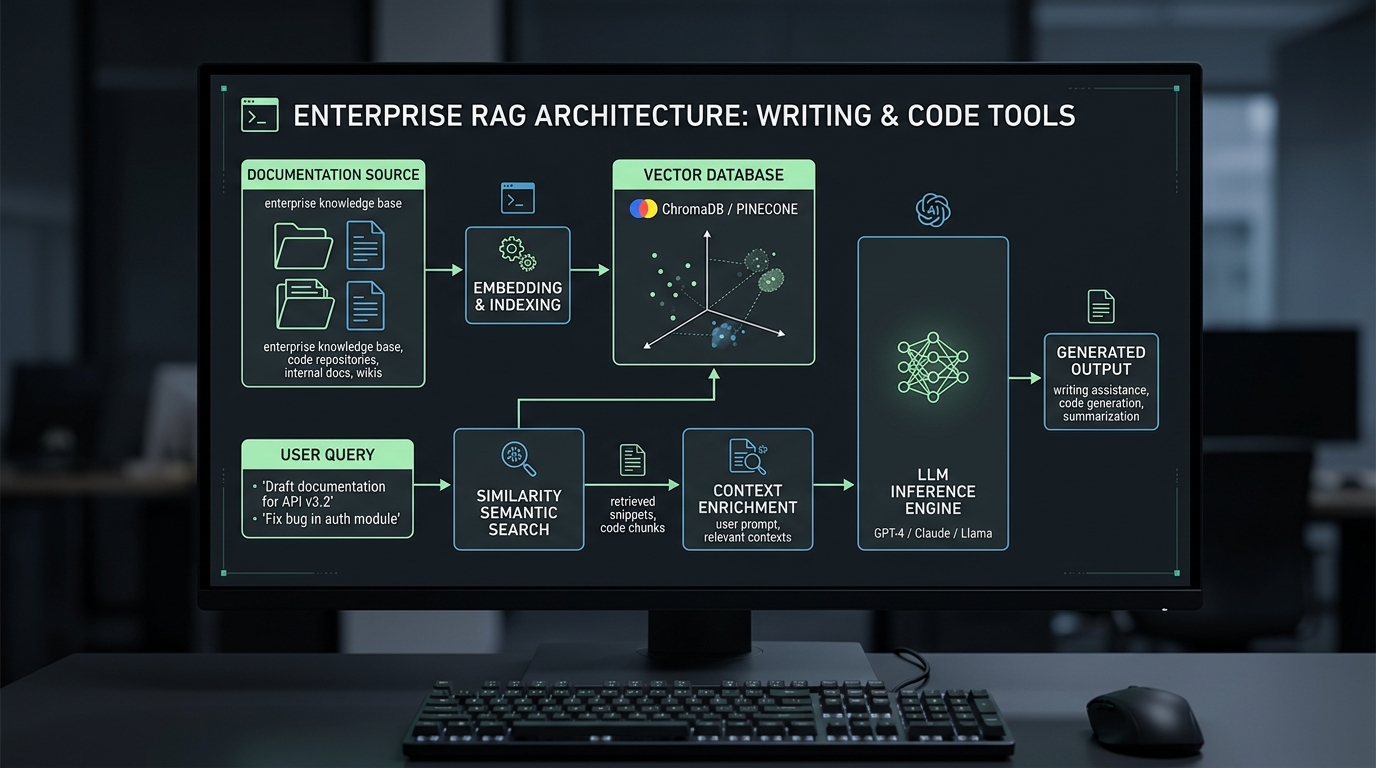
Standard ai writing tools function by utilizing transformer-based architectures that process input sequences through attention mechanisms. Unlike earlier iterations, the 2026 updates prioritize retrieval-augmented generation (RAG) to minimize hallucinations. When you deploy these tools, you are essentially managing a pipeline that connects your internal knowledge base to a large language model via a vector database. Understanding how these systems handle context is critical, especially when you consider the ChatGPT file upload limits that often dictate the maximum size of your engineering documentation or source code repositories.
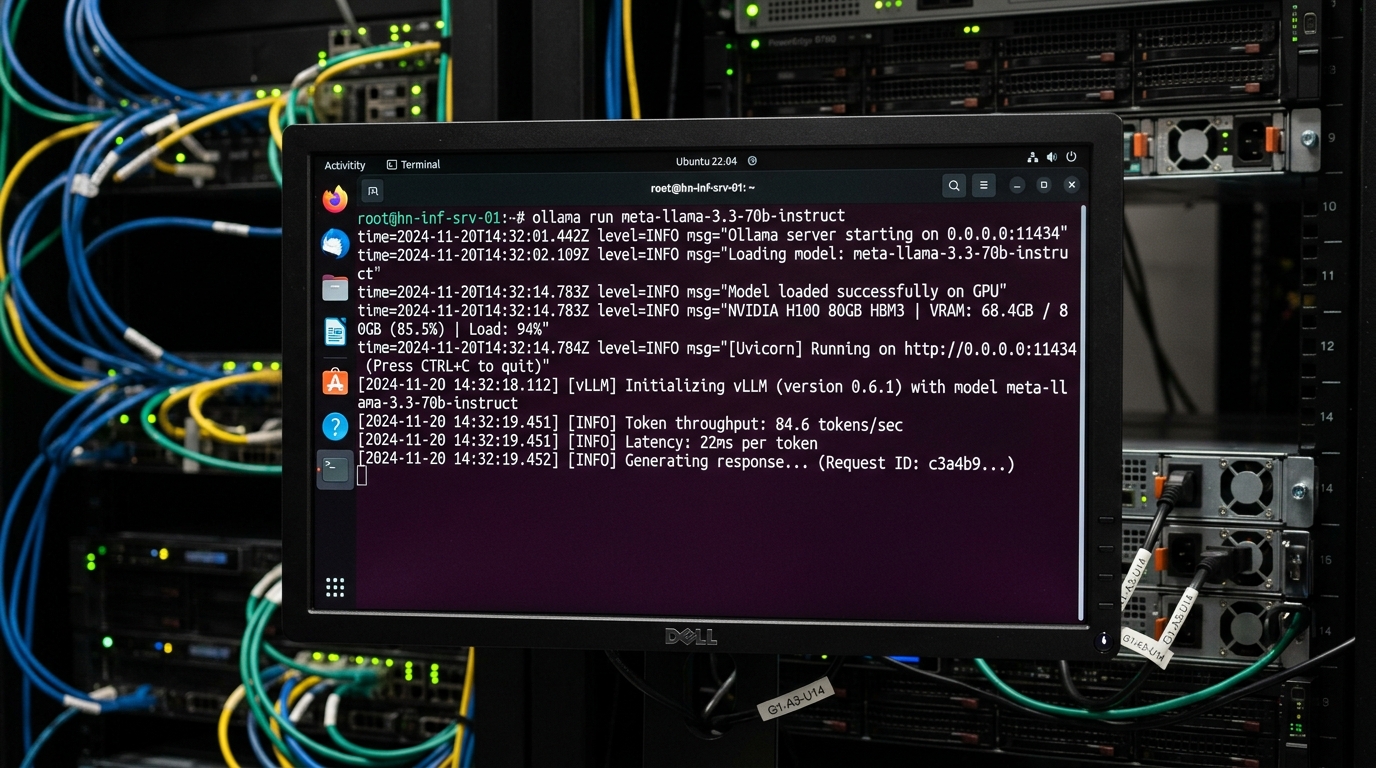
The efficiency of your ai writing assistant depends on the underlying hardware configuration. If you are running local instances or private cloud deployments, the AI chips architecture, including the specific allocation of GPU memory and NPU throughput, determines the latency of text generation. For enterprise teams, the goal is to balance the cost of inference with the speed required for real-time code completion. Misconfigurations in the container layer, such as improper resource limits, often lead to performance degradation that mimics network congestion.
Data flow in these systems typically follows a strict path: user input, prompt enrichment via metadata, vector search for relevant context, and final generation. If your infrastructure is built on Docker container architecture, you must ensure that your volumes are correctly mounted to allow the model to access persistent storage for long-term memory. Failure to manage these volumes results in stateless behavior, where the assistant forgets project-specific style guides or coding conventions between sessions.
Enterprise AI Writing Tools Comparison
| Feature | Cloud API | Local LLM | Enterprise Standard | Operational Trade-off |
|---|
| Latency | High (Network) | Low (Local) | Optimized | Compute Cost vs Speed |
| Privacy | External | Internal | Air-gapped | Security vs Flexibility |
| Context | Massive | Limited | Hybrid | Memory vs Accuracy |
Implementation Steps for AI Writing Assistants
To implement an ai writing assistant, you must first define the scope of the integration. Start by identifying the specific repositories or documentation sets that require assistance. Use a standardized prompt template to ensure consistency across the organization. This process involves creating a base configuration file that dictates the tone, engineering depth, and formatting requirements for all generated outputs. If you are using a local instance, verify that your environment variables are correctly set to prevent unauthorized access to your model endpoints.
- Provision the compute resources, ensuring that your GPU drivers are compatible with the model version.
- Configure the vector database to index your existing documentation, using a consistent schema for metadata tagging.
- Establish the API gateway or local interface, applying strict rate limiting to prevent resource exhaustion.
- Run a validation test using a known dataset to measure the accuracy of the generated content against your internal style manual.
Troubleshooting and Common Pitfalls
Operational failures in ai writing tools often stem from token overflow or context window exhaustion. When an assistant stops mid-sentence or provides generic responses, it is usually because the input prompt exceeded the maximum token limit. To fix this, implement a chunking strategy that breaks large documents into smaller, manageable segments before sending them to the model. You should also monitor your memory usage, as large context windows can lead to significant RAM utilization on the host machine.
Another frequent issue involves incorrect file permissions, which prevent the assistant from reading source files or writing output logs. Ensure that your service account has the correct read and write access to the relevant directories. If you encounter errors related to missing dependencies, verify your environment setup by checking the installed packages against your requirements file. In some cases, you may need to resolve conflicts by isolating the assistant in a dedicated virtual environment or container.
Finally, watch for hallucination patterns where the assistant generates code that references non-existent libraries or deprecated methods. This often happens when the model is trained on outdated data. To mitigate this, always provide the latest documentation or API specifications as part of the system prompt. If the assistant continues to provide incorrect code, check your system logs for error messages related to failed retrieval requests, which indicate that the vector database is not returning the correct context.
Optimizing Code Writing Assistants
When using ai for code writing, the primary goal is to ensure the output is syntactically correct and follows your organization's coding standards. You can achieve this by providing the assistant with a set of linting rules and style guides. Use the following command to verify that your local environment is correctly configured to interface with your chosen model:
# Check local inference server health and loaded model
curl -s http://localhost:11434/api/tags | jq .

# Benchmark token generation latency with a test prompt
curl -X POST http://localhost:11434/api/generate   -d '{"model": "llama3.3", "prompt": "Write a Python input sanitizer", "stream": false}'   | jq '{eval_count, eval_duration, total_duration}'
The integration of ai writing tools into the development lifecycle requires a shift in how you handle code reviews. Instead of reviewing every line, focus on validating the logic and security of the generated code. Ensure that your CI/CD pipeline includes automated tests that run against the output of the ai assistant. This adds a layer of protection against errors that might be introduced during the generation process, ensuring that your production environment remains stable.
Future Outlook and Maintenance
As we move through 2026, the focus will shift toward autonomous agents that can perform multi-step tasks without human intervention. This requires a more resilient approach to error handling and state management. You should prepare your infrastructure by implementing modular designs that allow you to swap out models as newer, more efficient versions become available. Keep your documentation updated and maintain a clear record of your prompt engineering strategies to ensure that your team can replicate successful outcomes.
Regular audits of your ai writing tools are necessary to ensure they continue to meet your performance and security requirements. Monitor the accuracy of the generated content and adjust your grounding data as your internal processes evolve. By maintaining a disciplined approach to configuration and testing, you can use these tools to improve productivity while minimizing the risks associated with automated content generation.