AWS EC2 Instance Types Explained: Sizing, Families and Costs
A practical breakdown of AWS EC2 instance families. Understand the difference between T4g, M6i, C7g, and R6i instances, and how to pick the right size for your budget and workload.
Selecting cloud server capacity on Amazon Web Services often turns into an expensive guessing game. Engineers frequently overprovision oversized instances to avoid mid-day outages, inflating monthly cloud spend by thousands of dollars. Conversely, choosing an underpowered instance leads to sudden memory exhaustion, dropped network packets, and sluggish API responses during peak traffic. Understanding the architectural differences between EC2 families allows infrastructure teams to optimize both uptime and compute costs.
Quick Architecture Summary
EC2 naming codes identify core specifications at a glance: c7g.2xlarge indicates Compute-optimized (c), 7th generation (7), AWS Graviton processor (g), and double extra large capacity (2xlarge with 8 vCPUs and 16 GiB RAM). Pick T4g for bursty development environments, C7g for high-throughput web frontends, M7g for balanced enterprise services, and R7g for caching layers and production databases.
The EC2 Naming Convention Decoded
AWS catalogs hundreds of instance offerings across distinct regions. Rather than memorizing arbitrary server models, parse the instance identifier string to immediately decipher hardware specifications.
Consider the instance string m7i-flex.4xlarge:
Instance Family (Prefix Letter): The initial letter establishes the fundamental compute-to-memory ratio. C stands for Compute, M denotes General Purpose (Middle / Balanced), R indicates RAM / Memory-optimized, and I or D specifies high-speed Local Storage.
Hardware Generation (Number): The numeric character indicates microarchitecture iteration. A 7th-generation host utilizes newer DDR5 memory and advanced PCI bus lanes compared to a 6th-generation host, delivering lower packet latency and increased instructions per clock cycle.
Processor Architecture (Suffix Letter): This character denotes silicon vendor. The letter g represents custom AWS Graviton ARM64 chips; a indicates AMD EPYC silicon; i specifies Intel Xeon Scalable processors. Instances lacking a vendor letter historically ran on legacy Intel hardware.
Additional Capabilities: Modifiers like -flex signify flexible compute scaling, d indicates direct-attached NVMe scratch storage disks, n denotes enhanced network throughput (up to 100 Gbps), and e represents extra local memory expansion.
Size Denomination (After the Period): From nano up to 48xlarge and bare-metal (metal), the size governs proportional allocations of physical CPU cores, gigabytes of RAM, and Amazon Elastic Block Store (EBS) bandwidth.
Core Compute Families and Architectural Trade-offs
Every workload exhibits distinct resource demand profiles. Some systems consume memory buffers while CPU cores sit idle; others max out mathematical calculation engines while barely utilizing 2 GB of memory. AWS aligns its primary instance fleet into four foundational tiers:
High-traffic Nginx web heads, video transcoders, mathematical modeling, continuous integration workers
General Purpose (M-Series)
1:4
m6i, m7g, m7a
Application backends, microservice pods in Kubernetes, small relational databases, message brokers
Memory Optimized (R-Series)
1:8
r6i, r7g, r7a
Production PostgreSQL/MySQL, Redis/Memcached cache nodes, Elasticsearch/OpenSearch clusters, real-time analytics
Selecting between these families requires identifying your primary bottleneck. Profiling your live process via htop or CloudWatch metrics reveals whether your hosts run out of memory space or hit compute ceilings during request spikes.
The cloud compute sector underwent a seismic transformation when AWS introduced its custom Graviton ARM silicon. For years, system architects selected exclusively between Intel Xeon and AMD EPYC x86 processors. Today, Graviton processors represent the standard choice for cost-conscious infrastructure teams.
Here is how the three processor architectures compare in actual production environments:
AWS Graviton (ARM64 Architecture): Chips like Graviton3 and Graviton4 deliver dedicated physical cores rather than shared simultaneous multithreading (SMT/hyperthreading). Every vCPU represents an isolated physical core, preventing noisy-neighbor cache contention. Graviton hosts cost roughly 20% less per hour than identical Intel nodes while offering 20% to 40% better throughput for web workloads written in Python, Node.js, Go, or Java.
AMD EPYC (x86 Architecture): Denoted by the a suffix (e.g., c7a.xlarge), AMD instances offer roughly 10% lower pricing than Intel configurations while maintaining full x86 software compatibility. They provide strong floating-point performance and support existing compiled binaries without recompilation.
Intel Xeon (x86 Architecture): Denoted by the i suffix (e.g., m7i.large), Intel instances provide advanced instruction sets like AVX-512 and Intel AMX (Advanced Matrix Extensions). Choose Intel if your enterprise application requires proprietary legacy x86 binary libraries, legacy Windows Server software, or specific Intel acceleration modules.
Burstable Performance and CPU Credit Mechanics
T-series instances (such as t4g.small and t3.medium) are engineered for bursty usage profiles. Instead of allocating dedicated 100% compute capability at all times, AWS grants a baseline CPU percentage (for example, 20% sustained utilization on a t4g.small).
When your instance operates below its baseline threshold, it accumulates CPU Credits into a reserve bank. When traffic surges, your instance bursts up to 100% capacity by consuming stored credits.
Production Warning Regarding T-Series: If your burstable instance exhausts its credit balance during sustained customer traffic, AWS enforces a hard cap at the baseline percentage. Web servers become unresponsive and queue latency spikes dramatically. Never deploy primary production databases or constant high-traffic APIs on burstable tiers without enabling T-Unlimited billing.
With T-Series Unlimited mode, instances can burst past their credit balances without performance degradation. However, AWS charges an additional fee for every surplus credit spent (typically 5 cents per vCPU-hour on Linux), which can result in surprise billing shocks if a runaway background process loops at 100% CPU overnight.
EBS Bandwidth Limits and Nitro Networking
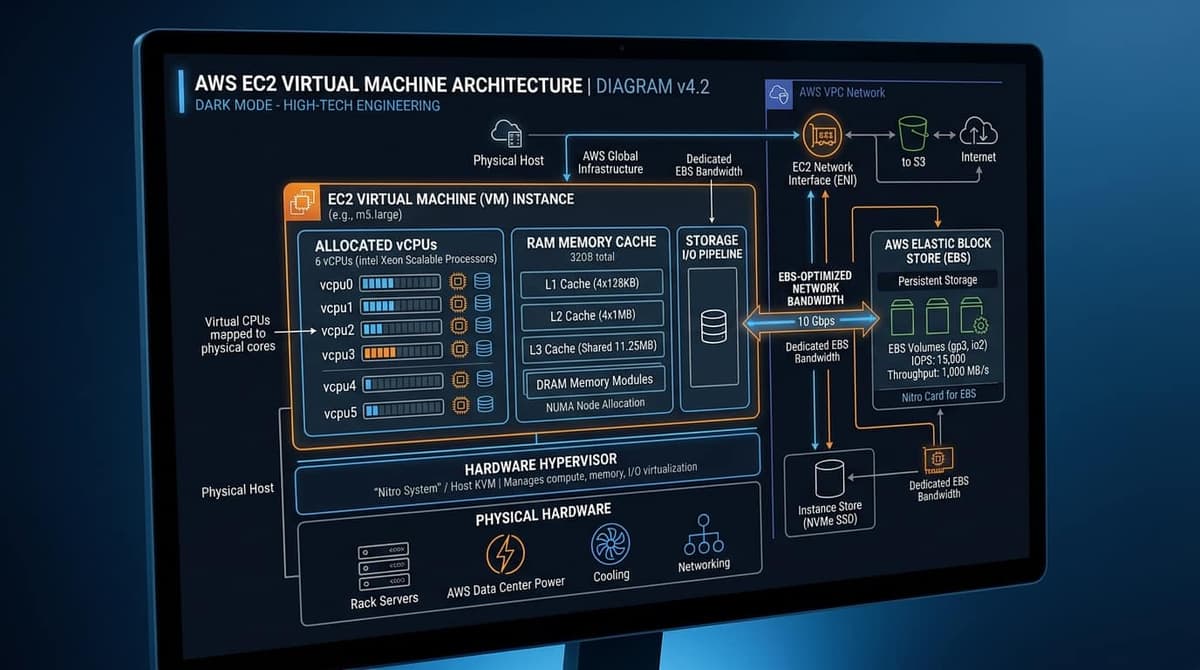
A frequent misconception among infrastructure engineers is assuming that provisioned SSD storage throughput depends solely on EBS volume settings (IOPS and throughput sliders). In reality, the EC2 instance size acts as a strict bottleneck between the virtual machine and the storage network.
Every instance tier enforces distinct hardware throttles:
EBS Optimized Bandwidth: A t4g.micro instance provides burst EBS throughput up to 2,085 Mbps, but maintains a meager baseline. If you attach a high-performance gp3 volume configured for 1,000 MB/s to a smaller instance, your actual disk write speed will throttle down to the instance ceiling.
Network Performance: Small tiers provide burstable network throughput labeled as "Up to 5 Gbps". Sustained high-volume file transfers will quickly exhaust network tokens, reducing throughput to several hundred megabits. Larger sizes (like c7g.4xlarge) offer dedicated baseline network pipes of 12.5 Gbps or higher.
The AWS Nitro System: Current-generation instances offload virtualization, storage IO, and security isolation onto dedicated Nitro ASIC cards. This architecture frees nearly 100% of host CPU and RAM resources for user processes while virtually eliminating hypervisor overhead.
Physical server hypervisor racks and fiber interconnects hosting multi-tenant EC2 compute nodes.
Production Sizing Guidelines for Common Workloads
When architecting a production cloud topology, follow these established sizing conventions:
1. Web Application Frontends and API Gateways
Deploy containerized web services across stateless Auto Scaling groups. When sizing virtual machines for container hosts, understanding Docker container architecture ensures your host OS kernel and cgroup memory limits align with your chosen EC2 vCPU footprint. Rather than creating a single massive host, launch multiple smaller nodes like c7g.large across at least three distinct Availability Zones. This design provides resilience against zone failures and allows granular scaling during sudden user spikes.
Databases require massive memory capacity to keep active indexes and hot tables loaded in RAM cache buffers (such as PostgreSQL shared buffers). Select Memory-optimized instances starting at r7g.xlarge (4 vCPUs, 32 GiB RAM). Ensure the instance type provides sufficient dedicated EBS bandwidth to handle peak write-ahead log (WAL) synchronization.
3. Redis and In-Memory Caching Layers
Because Redis executes on an in-memory single-threaded event loop for key retrieval, CPU clock speed and RAM density matter far more than core counts. Deploy Redis clusters on r7g.large or r7gd.large instances, which offer high memory-to-core ratios and exceptional price performance.
Automating Instance Discovery via AWS CLI
Avoid manual searching through web consoles. Use the AWS Command Line Interface combined with query filters to audit available hardware types, CPU architectures, and memory specifications inside your current region:
This command outputs a clean tabular summary showing instance designations, RAM capacity in megabytes, CPU core counts, and confirmed network bandwidth limits. When connecting to newly launched Linux instances via SSH key pairs, remember to configure proper Linux file permissions with chmod and chown on your private keys to prevent client authentication errors.
Cost Optimization: Spot Instances and Savings Plans
Running on-demand instances at full list price represents the least cost-effective method of buying cloud compute. Cloud engineering teams combine three pricing models:
Compute Savings Plans: Committing to a consistent amount of hourly compute spend over a 1-year or 3-year term yields discounts up to 66%. Compute Savings Plans apply automatically across instance families, operating systems, and AWS regions, providing maximum architectural flexibility.
Spot Instances: AWS sells surplus datacenter capacity at discounts reaching 70% to 90% below on-demand rates. Because AWS can reclaim Spot instances with a two-minute warning, deploy them exclusively for stateless worker queues, CI/CD runners, and fault-tolerant batch processors.
Graviton Migration: Converting existing x86 workloads to Graviton ARM64 instances immediately trims 20% off server compute costs without requiring long-term contractual commitments.
Frequently Asked Questions
The 'g' denotes AWS Graviton processors (64-bit ARM-based custom silicon engineered by AWS). Graviton instances typically deliver up to 40% better price-to-performance compared to comparable x86 Intel or AMD generations.
Evan Mitchell• Cloud Infrastructure Specialist & Systems Administrator3+ Years Industry Experience
Systems administrator with 3+ years managing enterprise Linux servers, AWS EC2 instances, and Docker containers. Evan focuses on practical bash scripting and secure network configurations.