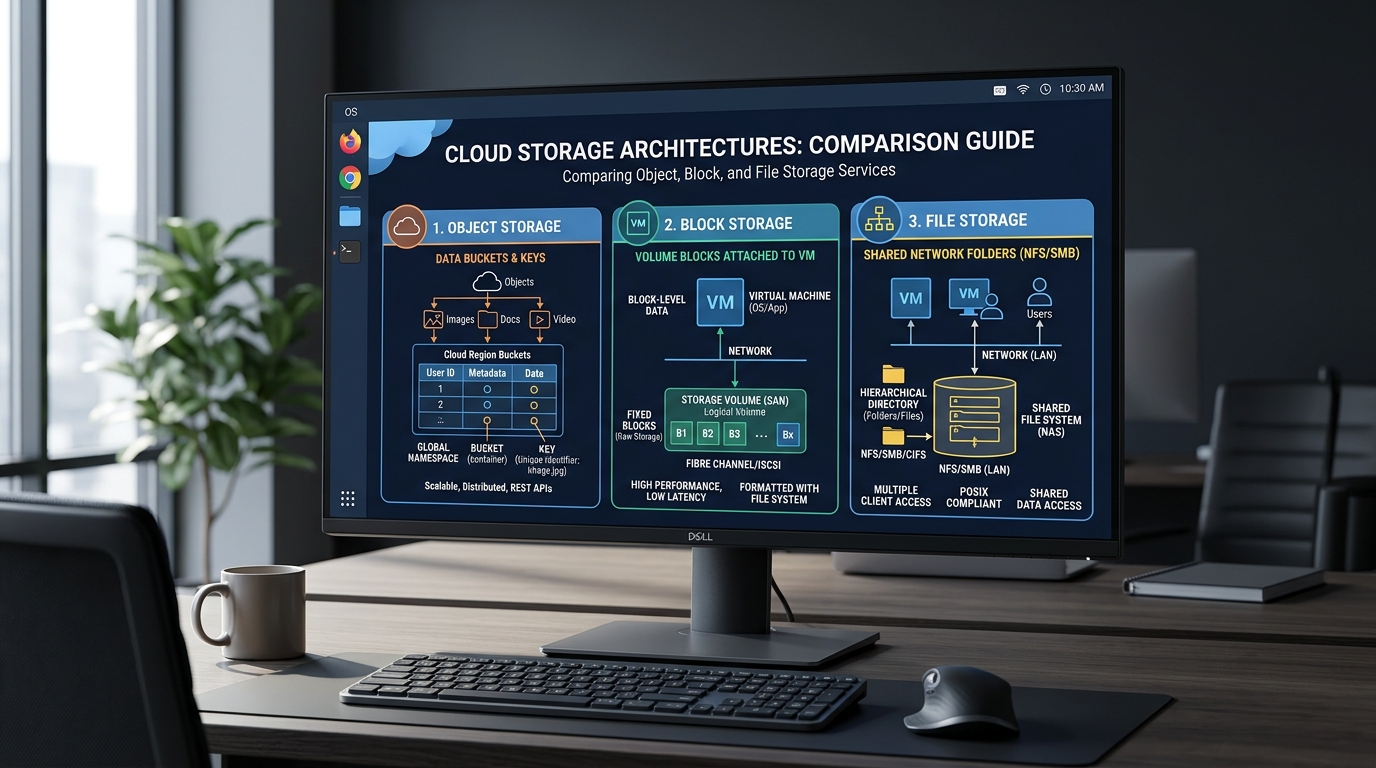
Cloud based file storage represents the abstraction of physical disk hardware into logical, network-accessible data containers. At the architectural level, engineers must choose between object, block, and file storage based on latency requirements, consistency models, and the specific access patterns of the application stack. Understanding these distinctions is necessary to prevent significant cost overruns and performance bottlenecks in production environments.
Quick Decision Matrix
Use block storage for high-performance databases and boot volumes. Use file storage for shared network directories and legacy application compatibility. Use object storage for massive, unstructured data lakes and static web assets where HTTP-based access is required.
Core Storage Architectures
Block Storage Mechanics
Block storage divides data into fixed-sized chunks, each with a unique identifier. The operating system treats these blocks as individual hard drives, allowing for low-latency read and write operations. This architecture is the standard for AWS EC2 instance types where high-performance input/output operations per second (IOPS) are required for database transactions or transactional logs.
Because block storage is attached directly to a compute instance, it is generally not shareable across multiple instances simultaneously without a cluster file system. When configuring these volumes, you must manage the file system layer, such as XFS or EXT4, directly on the block device. Mismanagement of these volumes often leads to data corruption if multiple instances attempt to mount the same block device without a distributed lock manager.
File Storage Systems
Cloud based file storage systems provide a hierarchical directory structure, similar to a traditional local file system. These systems use protocols like NFS or SMB to allow multiple compute instances to access the same data concurrently. This is the preferred method for shared configuration files, user-generated content, or web server backends that require a shared state across a load-balanced cluster.
While convenient, file storage introduces network latency that is absent in block storage. Engineers must account for the overhead of the network protocol when designing applications. Additionally, managing Linux file permissions across these shared mounts requires careful synchronization of user and group IDs across all client instances to ensure consistent access control.
Object Storage Paradigms
Object storage treats data as discrete units, or objects, stored in a flat address space. Each object contains the data, metadata, and a unique global identifier. Unlike file systems, you cannot modify a portion of an object; you must replace the entire object to update it. This makes object storage ideal for static assets, backups, and large-scale data archives.
Accessing object storage typically occurs via RESTful APIs rather than traditional file system calls. This architecture allows for massive scalability and durability, as data is replicated across multiple physical zones. However, the lack of a hierarchical directory structure means that applications must be designed to handle key-value lookups rather than path-based navigation.
Engineering Comparison Matrix
| Feature | Block | File | Object | Trade-off |
|---|
| Access Method | SCSI/NVMe | NFS/SMB | REST API | Latency vs Scale |
| Hierarchy | None | Folders | Flat/Buckets | Complexity |
| Performance | High IOPS | Medium | Variable | Throughput |
| Use Case | Databases | Shared Apps | Archives | Cost |
Implementation and Configuration
When deploying a cloud based file storage system, the initial setup involves defining the mount points and network security groups. For file storage, you must ensure that the security group allows traffic on port 2049 for NFS. Failure to configure these rules will result in connection timeouts during the mount process.
- Provision the file storage resource in your cloud console and note the mount target IP address.
- Install the necessary NFS client utilities on your Linux instance using your package manager, such as
sudo apt-get install nfs-common.
- Create a local directory to serve as the mount point:
sudo mkdir -p /mnt/shared_storage.
- Mount the remote file system:
sudo mount -t nfs4 -o nfsvers=4.1,rsize=1048576,wsize=1048576,hard,timeo=600,retrans=2 [mount-target-ip]:/ /mnt/shared_storage.
For containerized environments, you should integrate these storage volumes into your Docker container architecture using volume drivers. This ensures that your containers maintain state across restarts and deployments. Always verify that the underlying storage driver supports the specific file system features required by your application, such as file locking or atomic writes.
Troubleshooting and Common Pitfalls
The most frequent issue encountered in cloud based file storage is the "stale file handle" error. This typically occurs when a network interruption causes the client to lose connection to the storage server. To resolve this, you may need to force an unmount and remount of the volume. Use the umount -l /mnt/shared_storage command to perform a lazy unmount if the standard unmount command hangs.
Another common trap is the misconfiguration of IOPS limits on block storage. If your application experiences high latency, check the cloud provider metrics for "IOPS limit exceeded." You may need to provision additional throughput or switch to a higher-performance storage class. Additionally, ensure that your application is not performing excessive small-block writes, which can significantly degrade performance on network-attached storage.
# Check disk latency and IOPS usage
iostat -xz 1

# Verify mount status and options
mount | grep nfs

# Check for blocked processes waiting on I/O
ps aux | awk '$8=="D"'
Finally, monitor your storage costs closely. Orphaned block volumes that remain attached to terminated instances are a primary source of wasted infrastructure spend. Implement automated tagging and cleanup scripts to identify and delete unattached volumes that are no longer serving an active application.
Operational Guidelines for Scale
When scaling a cloud based file storage system, you must consider the impact of concurrent access on performance. As the number of clients increases, the metadata operations on a shared file system can become a bottleneck. If your application requires high concurrency, consider implementing a caching layer or transitioning to an object storage model where possible.
Data consistency is another critical factor. While block storage provides strong consistency, network-based file storage may have varying levels of consistency depending on the implementation. Always test your application's behavior under network partition scenarios to ensure that data integrity is maintained. Use checksums or application-level validation to detect potential corruption during transit.
Security should be enforced at the network and identity layers. Use IAM policies to restrict access to object storage buckets and ensure that file storage mounts are only accessible from authorized subnets. Regularly audit your access logs to identify unauthorized attempts to access sensitive data stores. By following these practices, you ensure that your storage infrastructure remains secure and performant as your application grows.