What is a Linux Device? Kernel Architecture and Enterprise Uses
Understand what constitutes a Linux device, exploring Unix hardware abstraction, character vs block devices, /dev nodes, udev subsystems, desktop environments, and enterprise computing.
From massive enterprise cloud clusters running Kubernetes in AWS to single-board micro-controllers operating inside industrial robotics, understanding what is a linux device lies at the heart of modern systems engineering. At its most fundamental technical level, a Linux device is any physical hardware component, virtual resource, or synthesized kernel interface that the operating system kernel recognizes, assigns drivers to, and exposes for communication. Following the classic Unix architectural maxim that "everything is a file," Linux bridges the complex realm of hardware registers and memory buses with simple, uniform filesystem nodes located in the /dev directory. Grasping how the Linux kernel abstracts, manages, and interacts with these devices unlocks powerful capabilities for system administrators, DevOps engineers, and everyday computer enthusiasts.
The Three Architectural Pillars of Linux Devices
The Linux operating system processes hardware through three tightly coupled subsystems that turn electrical signals into standard data streams:
1. Kernel Driver Layer
Modules & Bus Probing
PCIe, USB, I2C, and NVMe hardware controllers
2. Virtual Filesystem (VFS)
/dev Special Nodes
Character and block device endpoints with major/minor IDs
3. Dynamic Device Manager
udev & sysfs Engine
Hotplug event handling, permission rules, and persistent symlinks
Defining a Linux Device: From Silicon to Unix Philosophy
When asking what is a linux device in an IT operations context, the answer depends on whether you look at the physical hardware or the operating system kernel. Physically, a Linux device is any computing appliance, server chassis, edge gateway, network router, or single-board computer (such as a Raspberry Pi) running a Linux kernel as its primary operating system. In this broad physical context, what is a linux machine encompasses hardware that powers over 90 percent of public cloud workloads, the world top 500 supercomputers, smart televisions, aerospace avionics, and billions of mobile smartphones.
Internally within the operating system, what is linux device abstraction refers to the software representation of physical and virtual hardware resources. The Linux kernel does not force application programmers to write low-level machine code targeting proprietary chipset registers. Instead, the kernel presents an abstracted interface. When an application reads from an NVMe solid-state drive, captures video from a USB camera, or transmits network packets over an Ethernet port, it speaks to a standardized Linux device driver through standard system calls.
This elegant design enables extraordinary portability across computer hardware. A developer can write a C, Go, or Python application that opens a file descriptor, writes data to it, and closes it, completely unaware of whether the underlying storage is an enterprise SAN array, a local SATA drive, or an emulated RAM disk. If you are preparing your foundational server environment, our comprehensive guide on how to install and configure Ubuntu Server demonstrates how modern distributions detect and initialize these device components during installation.
What is Linux? Kernel, Software Stack & System Architecture
To truly understand device communication, one must answer the broader question: what is linux and what is linux operating system in practice? In precise computer science terms, Linux itself is not an entire operating system; Linux is an open source monolithic kernel originally created by Linus Torvalds in 1991. The kernel acts as the core conductor between a computer processor, memory, and peripherals. When people discuss what is linux software or refer to a complete linux system, they are describing the combination of the Linux kernel paired with GNU system utilities, systemd service managers, compilers, and user applications.
The Layers of a Linux System: How Does Linux Work?
Understanding how does linux operating system work requires looking at four interconnected architectural tiers:
Physical Hardware Layer: The CPU, RAM, disk controllers, networking chips, and input buses that execute electrical operations.
Linux Kernel: Manages memory paging, schedules process threads, handles interrupt requests, and maintains device drivers.
GNU System Libraries & Shell (User Space): Exposes the POSIX API via glibc, enabling utilities like bash, coreutils, and daemons to interact with kernel services.
Application Layer: Web servers (Nginx, Apache), databases (PostgreSQL), container runtimes (Docker), and desktop productivity tools.
When evaluating linux definition and linux meaning, the fundamental takeaway is modularity. Under the hood, what does linux do? It coordinates hardware interrupts and isolates software processes so that a misbehaving application cannot crash the underlying physical machine. This architectural resilience explains why use linux is the standard answer for enterprise infrastructure, financial trading platforms, and web hosting providers worldwide.
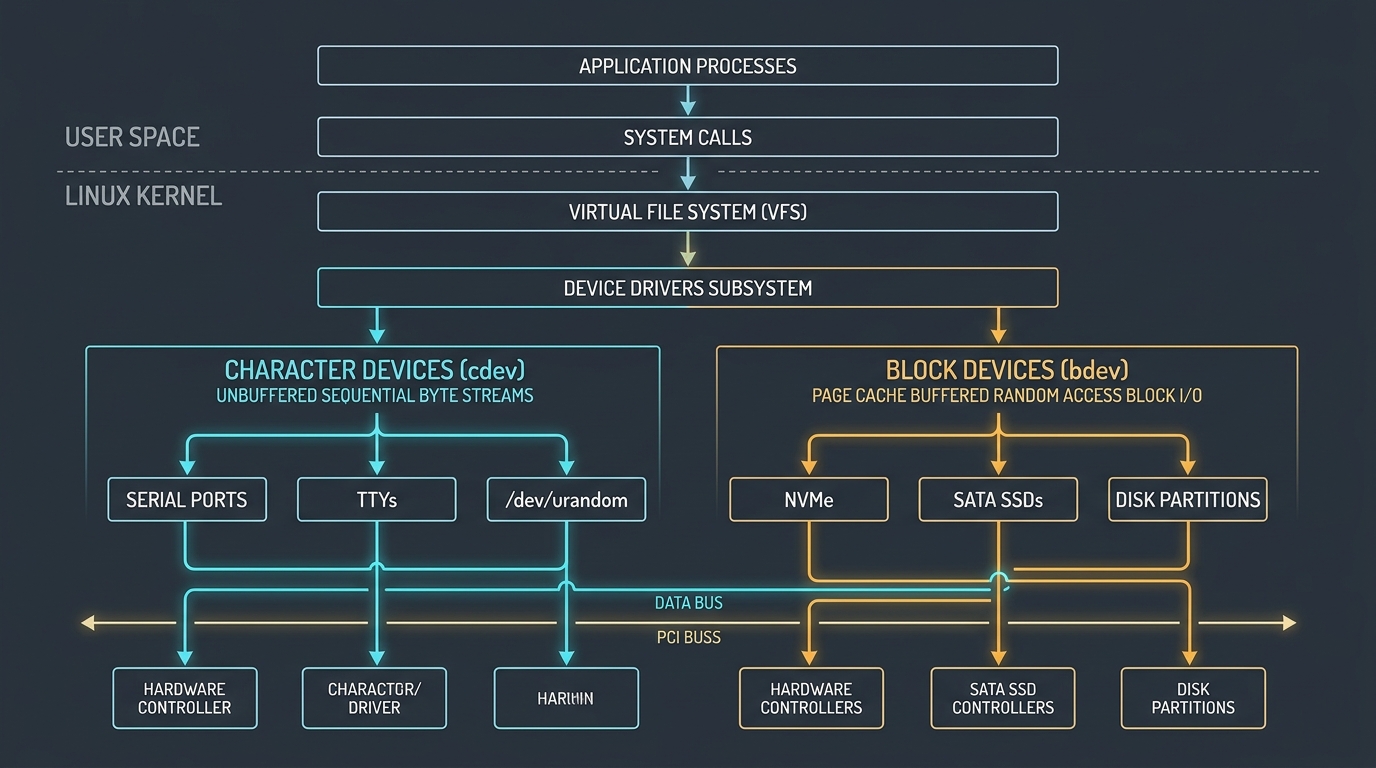
Linux kernel device subsystem architecture illustrating VFS routing between unbuffered character streams and cached block storage.
Is Linux Free? Open Source Licensing & Total Cost of Ownership
Prospective adopters routinely ask: is linux operating system free, and how much does linux cost? The direct answer is that linux is an open source software project licensed under the GNU General Public License version 2 (GPLv2). Because is linux open source by definition, anyone can inspect, modify, compile, and redistribute the source code without paying upfront license royalties.
Licensing Metric
Community Linux Distributions
Enterprise Commercial Linux
Proprietary Commercial OS
Base Software License
$0 (GPLv2 / Open Source)
$0 for source code
$140 to $1,000+ per license
Per-Seat Client Access Licenses (CALs)
None required
None required
Required per user/device
Commercial Support Model
Community forums & documentation
Annual enterprise SLA subscriptions
Tiered enterprise contracts
Representative Examples
Ubuntu, Debian, Linux Mint, Fedora
Red Hat Enterprise Linux, SUSE
Windows Server, macOS
When evaluating linux software price, linux operating system price, and linux cost in corporate budgets, businesses find that the base price of linux is zero dollars. While commercial distributions like Red Hat Enterprise Linux charge annual subscription fees for certified drivers, automated patches, and 24/7 technical hotlines, community editions like Ubuntu LTS, Debian, and Linux Mint carry zero licensing cost. For individuals asking is linux an open source operating system suitable for personal use, you can download, install, and run Linux on an unlimited number of laptops and servers completely free of charge.
The Unix Abstraction: "Everything is a File" in Practice
One of the greatest architectural innovations inherited by Linux from the original Unix development team at Bell Labs is the concept that hardware peripherals and kernel services should be accessed via standard filesystem paradigms. In many proprietary operating systems, accessing hardware requires proprietary APIs, specialized dynamic libraries, and unique function prototypes for every device class.
In Linux, the Virtual Filesystem (VFS) abstracts almost all input/output hardware as specialized file entries located in the /dev directory (short for devices). This means user-space applications can communicate with physical devices using the exact same standard POSIX system calls used for regular text files:
Core POSIX System Calls for Linux Device Communication
open(): Connects to the device file node in /dev and returns an integer file descriptor.
read(): Retrieves a sequence of bytes from the hardware buffer or serial stream.
write(): Dispatches a buffer of bytes across the driver to the physical hardware.
ioctl(): (Input/Output Control) Sends out-of-band hardware management commands, such as changing baud rates, querying sensor calibrations, or triggering disk flushes.
close(): Releases the file descriptor and disconnects from the device driver.
Because devices present as files, administrators can utilize standard shell utilities like cat, echo, dd, and redirection operators directly with hardware. For example, echoing a configuration string to /dev/ttyUSB0 transmits characters out of a physical serial port, while piping /dev/urandom into a cryptographic utility generates entropy without proprietary libraries.
Character Devices vs Block Devices: Memory Buffers & I/O Streams
To handle wildly different hardware operational profiles, the Linux kernel divides storage and communication interfaces into two primary categories: Character Devices and Block Devices. A third category, Network Devices, exists in the kernel networking stack but bypasses direct /dev nodes in favor of socket APIs.
Character Devices (c)
Character devices transmit information as an unbuffered, continuous stream of individual bytes or characters, sequentially, without random seeking:
Sequential Access: Data is read or written in the exact order it arrives (FIFO). You cannot jump backward or seek to an arbitrary byte offset.
No Kernel Buffer Cache: Data passes directly between the application and the hardware driver without residing in the kernel page cache.
Real-World Examples: Virtual terminals (/dev/tty1), serial interfaces (/dev/ttyS0), sound cards, random generators (/dev/urandom), mice, and keyboards.
Directory Flag: Displayed with a leading c in ls -l /dev output.
Block Devices (b)
Block devices represent persistent storage media capable of transferring structured, fixed-size chunks of data (typically 512 bytes or 4,096 bytes per block):
Random Access & Seeking: Applications and filesystems can seek directly to any arbitrary sector or block without reading previous data.
Heavy Kernel Page Caching: Reads and writes pass through the Linux page cache buffer layer, drastically boosting read throughput and batching writes.
Real-World Examples: NVMe SSDs (/dev/nvme0n1), SATA drives (/dev/sda), loopback disk images (/dev/loop0), and enterprise SAN LUNs.
Directory Flag: Displayed with a leading b in ls -l /dev output.
When managing enterprise storage architectures, understanding the performance trade-offs between block-level storage and higher-level shared filesystems is crucial. Explore our detailed infrastructure breakdown on what is cloud storage: object vs block vs file storage to see how block devices underpin enterprise cloud volumes.
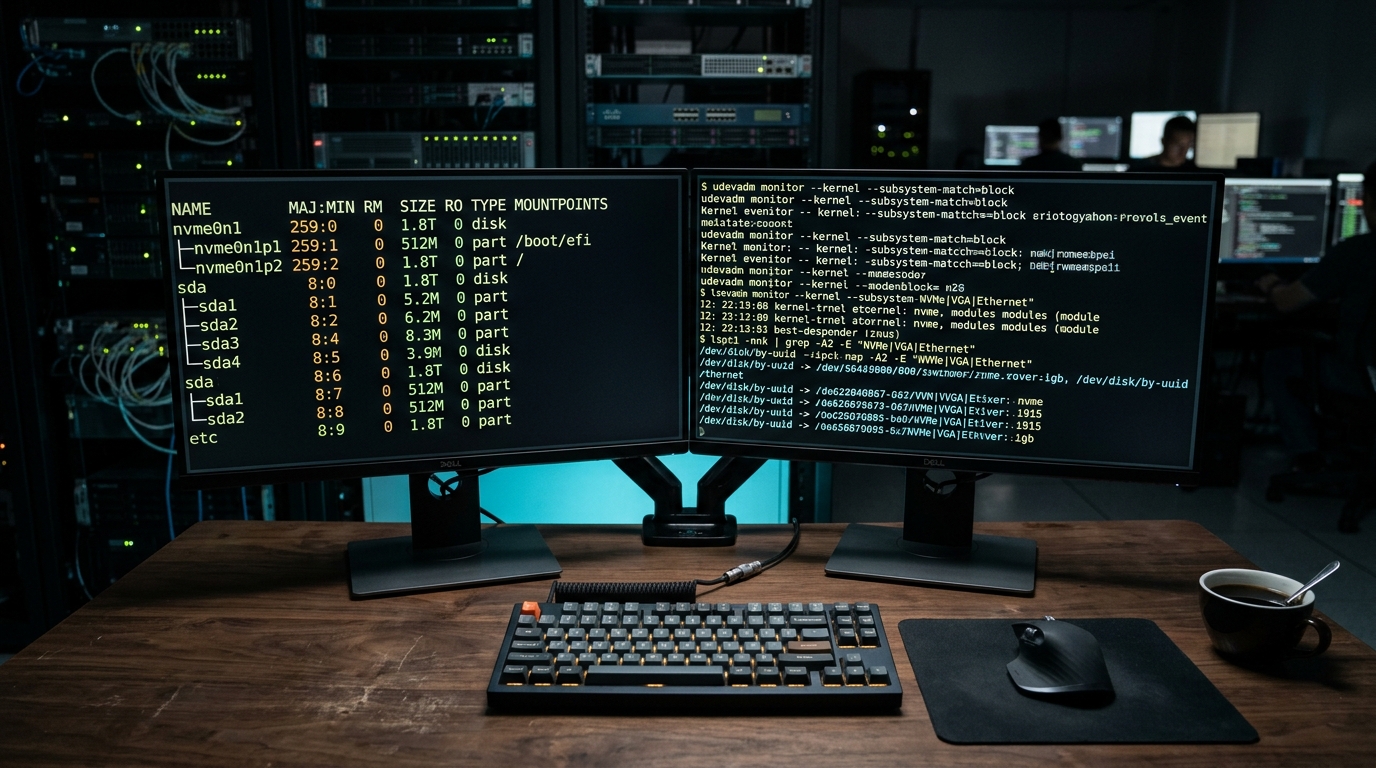
Linux hardware diagnostics in action: inspecting active device nodes, major and minor IDs, and kernel driver bindings.
Anatomy of the /dev Directory & Special Pseudo-Devices
When you inspect the contents of the /dev directory on a running Linux server, you are not browsing files saved on a magnetic platter or flash chip. Instead, /dev is a virtual mount point populated by devtmpfs, an in-memory filesystem managed directly by the Linux kernel. Every file inside /dev is a portal connecting directly to a specific driver registered in kernel space.
In addition to physical hardware mappings, Linux provides a suite of indispensable pseudo-devices (synthetic devices generated purely by kernel code). These pseudo-devices are foundational building blocks for shell scripting, system automation, and security:
1. /dev/null (The Bit Bucket)
Often referred to as the black hole of Unix, any data written to /dev/null is immediately discarded without consuming disk space or memory. When read, it instantly returns an End-Of-File (EOF) marker.
# Discarding standard error output in automated scripts
./deploy-service.sh 2> /dev/null
2. /dev/zero (Continuous Null Stream)
Reading from /dev/zero produces an endless stream of binary null bytes (ASCII NUL, value 0x00). It is universally used to initialize empty files, zero out drive partitions, or create swap space.
# Generating a 1GB empty file for swap space
dd if=/dev/zero of=/swapfile bs=1M count=1024 status=progress
These pseudo-devices tap into the Linux kernel cryptographic entropy pool, which gathers unpredictable environmental noise from hardware interrupts, keyboard latency, and thermal sensors. /dev/urandom outputs high-performance, non-blocking pseudo-random bytes perfect for SSL keys, session tokens, and password salts.
# Generating a secure 32-character base64 authentication secret
head -c 32 /dev/urandom | base64
Device Nodes, Major and Minor Numbers, and sysfs
When you view a device node using ls -l /dev, you will notice that where file size normally appears for regular files, two comma-separated numbers are printed instead. These are the Major and Minor device numbers:
$ ls -l /dev/sda /dev/sda1 /dev/tty0 /dev/urandom
brw-rw---- 1 root disk   8,  0 Oct 24 09:12 /dev/sda
brw-rw---- 1 root disk   8,  1 Oct 24 09:12 /dev/sda1
crw--w---- 1 root tty    4,  0 Oct 24 09:12 /dev/tty0
crw-rw-rw- 1 root root   1,  9 Oct 24 09:12 /dev/urandom
^                      ^   ^
|                      |   |-- Minor Number (Specific instance / partition)
|                      +------ Major Number (Kernel driver category)
+----------------------------- Type: 'b' for block, 'c' for character
How the Kernel Resolves Device Numbers
Major Number: Identifies which specific device driver inside the kernel is responsible for managing this hardware. For instance, Major number 8 tells the kernel to hand all I/O requests to the SCSI/SATA disk driver. Major number 1 indicates base memory/pseudo devices. Major number 4 maps to virtual terminal consoles.
Minor Number: Tells the assigned driver which unique physical unit or sub-partition is being addressed. In the example above, 8, 0 points to the entire physical drive /dev/sda, while 8, 1 points specifically to partition 1 on that same drive.
Historical Device Node Creation: Traditionally, nodes were manually instantiated using the mknod utility (e.g., mknod /dev/custom_dev c 240 0). In modern Linux, this static manual workflow has been completely replaced by dynamic hotplug management.
Alongside /dev, the Linux kernel exposes /sys (the sysfs virtual filesystem). While /dev provides the communication data endpoints, /sys exposes the hierarchical hardware structure, allowing administrators to inspect PCIe bus topologies, firmware revisions, queue depths, and thermal sensor readings in real time.
The udev Subsystem: Dynamic Hotplugging & Persistent Naming
In early versions of Linux, the /dev directory contained thousands of static device files created ahead of time for every conceivable hardware combination, regardless of whether that hardware actually existed in the system. If you plugged in two USB drives, the kernel might name the first one /dev/sdb on Monday, but if plugged in reverse order on Tuesday, it might assign /dev/sdc, breaking hardcoded mount configurations.
Modern Linux resolves this instability through the udev dynamic device manager, which runs as a system daemon (systemd-udevd). The udev subsystem orchestrates hotplug events through an automated, event-driven lifecycle:
The Dynamic Hotplug Lifecycle
Kernel Hardware Detection: When you connect a physical peripheral (such as an NVMe drive, USB flash storage, or PCIe network card), the Linux kernel detects the electrical state change, loads the appropriate kernel module driver, and broadcasts a uevent through a netlink socket.
udev Event Processing: The systemd-udevd daemon intercepts the uevent, gathers hardware properties from /sys (such as vendor ID, model name, and serial number), and evaluates system configuration rules stored in /etc/udev/rules.d/.
Node Creation and Symlinking: udev creates the active device node in /dev, assigns strict Unix ownership permissions, and constructs persistent symbolic links inside /dev/disk/by-uuid/, /dev/disk/by-id/, and /dev/serial/by-id/.
Event Dispatch: udev triggers user-space actions, such as notifying desktop environments to display notification pop-ups or invoking systemd mount services.
This persistent symlink architecture is why production servers never reference transient device names like /dev/sdb1 inside /etc/fstab. By mounting filesystems using persistent UUIDs (e.g., UUID=3a2b4c5d-...), your server boots reliably even if storage controllers are reordered or drive bays are swapped.
What Does Linux Look Like? Desktop Environments & Laptops
For newcomers accustomed to commercial operating systems, a common query is what does linux look like and what does a linux operating system look like on personal computers. Unlike Windows or macOS, where the graphical user interface is permanently fused to the operating system, a linux pc completely decouples the graphical interface from the underlying kernel. Users can install a variety of linux desktop environments depending on their personal aesthetic preferences and hardware resources.
Cinnamon & XFCE (Windows-Familiar Layouts)
If you are searching for a windows like linux distro or the best linux version for windows users transitioning away from Windows 7, 10, or 11, desktop environments like Cinnamon and XFCE offer an immediately recognizable bottom taskbar, traditional start menu, and system tray.
Linux Mint: Acclaimed as ideal linux mint for beginners. When asking what is linux mint based on, it is built on Ubuntu LTS (with a Debian-based variant called LMDE). It allows users to download software linux mint via a one-click graphical Software Manager featuring the best linux mint applications like LibreOffice, VLC, and Firefox.
Reviving Older Hardware: Light desktop distributions act as an efficient linux operating system for windows 7 legacy machines, restoring fast performance to aging PCs.
GNOME & KDE Plasma (Modern Powerhouses)
For users seeking cool linux desktops with cutting-edge visual polish and deep workflow customization:
GNOME: The default desktop on Ubuntu and Fedora. Offers a clean, distraction-free environment centered around virtual workspaces, touchpad gestures, and fluid app launchers.
KDE Plasma: One of the most technologically advanced linux with desktop interfaces. Features buttery smooth animations, fractional Wayland display scaling, and granular widget customizations.
Laptop Efficiency: When selecting the best version of linux for laptop, best linux flavor for laptop, or best linux distro for notebooks, modern kernels deliver exceptional battery life, standby sleep states, and touchpad gesture integration on portable machines.
ChromeOS Crostini Containers & Running Linux on Windows
The versatility of the Linux architecture extends far beyond standalone installations. Millions of users experience Linux daily through consumer hardware like Chromebooks or inside corporate Windows workstations:
Chromebooks and Crostini: Is ChromeOS Linux?
Users often ask is chromeos linux or is chrome os linux? Yes, ChromeOS is built directly on top of the Linux kernel. To empower programmers and students, Google introduced Crostini (originally known as Linux Beta on ChromeOS). Crostini creates a seamless linux development environment inside a secure virtual machine, allowing Chromebook users to run native Linux desktop apps, code editors like VS Code, and command-line terminal utilities alongside cloud web apps. Keeping your environment secure is as simple as running terminal updates to update crostini packages.
Running Linux on Windows: WSL2 Workflows
If you are wondering how can i run linux on windows or how to setup linux on windows without wiping your current hard drive, Microsoft provides the Windows Subsystem for Linux (WSL2). WSL2 runs a genuine Linux kernel inside a lightweight Hyper-V utility VM, enabling developers to run bash commands, install apt packages, and test microservices directly inside PowerShell without configuring complex dual-boot partitions.
Enterprise Deployments: From Edge IoT to Hyperscale Cloud Instances
The flexibility of the Linux device model is the primary reason Linux dominates modern enterprise technology. Across different sectors of industry, Linux devices fulfill distinct operational roles:
1. Cloud Infrastructure & Virtualized Instances
In Amazon Web Services (AWS EC2), Google Cloud Platform (GCP), and Microsoft Azure, virtual instances interact with synthetic block devices provided by hypervisors. Cloud volumes (such as AWS EBS) attach to virtual machines as NVMe block devices (/dev/nvme1n1). The Linux kernel communicates with these hypervisor paravirtualized devices using zero-copy virtio drivers, achieving millions of IOPS without bare-metal overhead.
2. Edge Computing & Industrial Automation (IIoT)
In smart manufacturing, automotive telematics, and telecom cell towers, ruggedized Linux devices run custom embedded distributions (such as Yocto or Buildroot). These embedded appliances communicate with serial fieldbuses (RS-485, CAN bus, I2C, SPI) directly through character device nodes. Field technicians update firmware and read sensor telemetry by interacting with exposed GPIO device nodes.
3. Containerization and Device Passthrough (Docker & Kubernetes)
Because containers share the host Linux kernel, exposing physical hardware to a containerized microservice does not require emulation. By utilizing container device flags (such as --device=/dev/dri for GPU video rendering or --device=/dev/ttyUSB0 for serial readers), administrators grant isolated containers direct high-speed access to host silicon with native performance.
When managing multi-tenant Linux hosts or orchestrating high-density container clusters, monitoring process execution and kernel resource utilization is vital. Read our operational manual on what is task manager and process monitoring to learn how top, htop, and terminal diagnostics expose hardware consumption across active tasks.
Hands-On CLI: Essential Commands for Inspecting Linux Devices
When troubleshooting hardware recognition, checking storage layouts, or verifying serial attachments, Linux administrators rely on a core toolkit of command-line utilities. Below is an essential reference guide for daily operational diagnostics:
Command Syntax
Hardware Subsystem
Primary Administrative Output
lsblk -f
Block Storage
Displays tree view of block devices, partitions, filesystem types, and UUIDs
lspci -nnk
PCI / PCIe Buses
Lists all PCIe controllers, network chips, GPUs, and currently active kernel drivers
lsusb -v
USB Subsystem
Enumerates connected USB controllers, hub bridges, serial adapters, and power specs
lshw -short
Complete System
Generates a concise inventory of CPU, RAM banks, motherboards, disks, and bridges
udevadm monitor
Dynamic Hotplug
Streams live kernel uevents and udev rule matches as hardware is attached or removed
dmesg -T | grep -i
Kernel Ring Buffer
Inspects raw kernel boot messages and hardware initialization logs with real timestamps
Practical Diagnostic Workflow: Tracking a Newly Attached Storage Device
# 1. Check recent kernel events after attaching storage
dmesg -T | tail -n 25

# 2. Inspect block storage hierarchy and mount points
lsblk -o NAME,SIZE,TYPE,FSTYPE,MOUNTPOINT,UUID

# 3. Query deep udev attributes for writing custom automation rules
udevadm info --query=all --name=/dev/sdb
Working with Linux devices occasionally presents operational hurdles where hardware appears unreadable or inaccessible. Below are proven remediation techniques for the most common administrative roadblocks:
1. Resolving "Permission Denied" on Device Nodes
By default, sensitive device files (such as serial ports /dev/ttyUSB0 or disk raw nodes) are owned by root with group permissions set to dialout or disk. Instead of running applications insecurely as root or executing unsafe chmod 777 commands, add your service user account to the supplementary hardware group:
# Add active user to the dialout group for serial communication
sudo usermod -aG dialout $USER

# Apply the new group membership to the active shell session
newgrp dialout
When attempting to unmount a block device (umount /dev/sdb1), the kernel will refuse if a process holds open file descriptors on that filesystem. Use lsof or fuser to isolate the locking process PID:
# Identify which process is holding the mount point open
sudo lsof +f -- /mnt/data-volume

# Gracefully terminate the offending process before unmounting
sudo fuser -km /mnt/data-volume
sudo umount /mnt/data-volume
If hardware is connected physically but does not create a corresponding node in /dev, the kernel may lack the required driver module. Inspect lspci -k to verify whether a driver is claimed, and manually probe modules using modprobe:
# Manually load a kernel device driver module
sudo modprobe ftdi_sio

# Verify that the module is loaded and active
lsmod | grep ftdi
For additional server deployment guides, container strategies, and enterprise infrastructure tutorials, explore our comprehensive collection in the Cloud & Infrastructure category hub.
Frequently Asked Questions
A Linux device refers to either a physical computing appliance running the Linux kernel (such as a cloud server, IoT gateway, or Android hardware) or the kernel software abstraction of hardware components. Internally, Linux represents hardware peripherals and virtual interfaces as specialized device files located inside the /dev directory.
Evan Mitchell• Cloud Infrastructure Specialist & Systems Administrator3+ Years Industry Experience
Systems administrator with 3+ years managing enterprise Linux servers, AWS EC2 instances, and Docker containers. Evan focuses on practical bash scripting and secure network configurations.