Cloud Accounting for Small Business Platform Setup
Set up cloud accounting for small business operations: connect Open Banking API feeds, automate double-entry ledgers, and maintain accurate financial records.
Cloud accounting for small business operations represents a foundational shift from isolated desktop software to distributed, API-connected financial systems. Managing company finances in the cloud replaces manual bookkeeping spreadsheets with real-time double-entry ledgers, automated banking data feeds, and cryptographic audit trails. Systems administrators, startup operators, and finance controllers must evaluate multi-tenant architectures, regulatory compliance controls, and data migration protocols to maintain accurate financial ledgers.
Quick Decision Matrix
Choose QuickBooks Online for extensive third-party accountant ecosystem integration, Xero for unlimited user seats and strong inventory handling, Zoho Books for integrated CRM workflows, and FreshBooks for service-focused client billing with time tracking.
Core Architecture and Cloud Double-Entry Ledgers
Multi-Tenant Databases and ACID Compliance
Legacy accounting packages relied on local file formats like QBW or static workbooks stored on local hard drives. This architectural model suffered from file corruption risks, single-user lockouts, and manual backup dependencies. If a workstation crashed during a transaction write, the underlying database often corrupted, requiring expensive reconstruction.
Cloud accounting platforms run on multi-tenant cloud infrastructure powered by relational databases that enforce strict ACID (Atomicity, Consistency, Isolation, Durability) guarantees. In double-entry bookkeeping, every financial transaction requires balanced debits and credits across assets, liabilities, and equity. The underlying database ensures that a transaction write never commits halfway: if debiting an account succeeds but crediting another fails, the database engine rolls back the entire transaction instantly, preserving numerical balance across accounts.
Consider a standard business sale of $1,000 with 8% sales tax. The relational database records balanced entries across multiple ledger tables simultaneously within a single atomic transaction block:
Because the transaction engine guarantees atomicity, neither network drops nor client session disconnects can leave accounts out of balance.
Advantages of Cloud Accounting Over On-Premise Systems
When evaluating why use cloud accounting, comparing contemporary web systems against legacy on premise accounting software highlights major operational efficiencies. The primary advantages of cloud accounting center on continuous uptime, zero manual database patching, and remote accessibility across distributed teams. Understanding the advantages of cloud based accounting software and advantages of cloud accounting software enables founders to eliminate dedicated local server maintenance costs.
The core benefits of cloud accounting include automated daily bank reconciliation, frictionless multi-user collaboration, and cryptographic security that surpasses local PC storage. When analyzing the benefits of cloud accounting software, organizations avoid catastrophic data loss from workstation hardware failures. Distributed cloud platforms replicate financial records across multiple availability zones in real time, mirroring data protection frameworks used in cloud based file storage infrastructures.
Open Banking API Feeds and Automated Reconciliation
Direct Financial APIs Versus Screen Scraping
Historically, connecting desktop accounting software to banking institutions relied on fragile screen scraping or manual OFX statement downloads. If a bank updated its customer login layout, transaction sync broke immediately, leaving financial records weeks out of date.
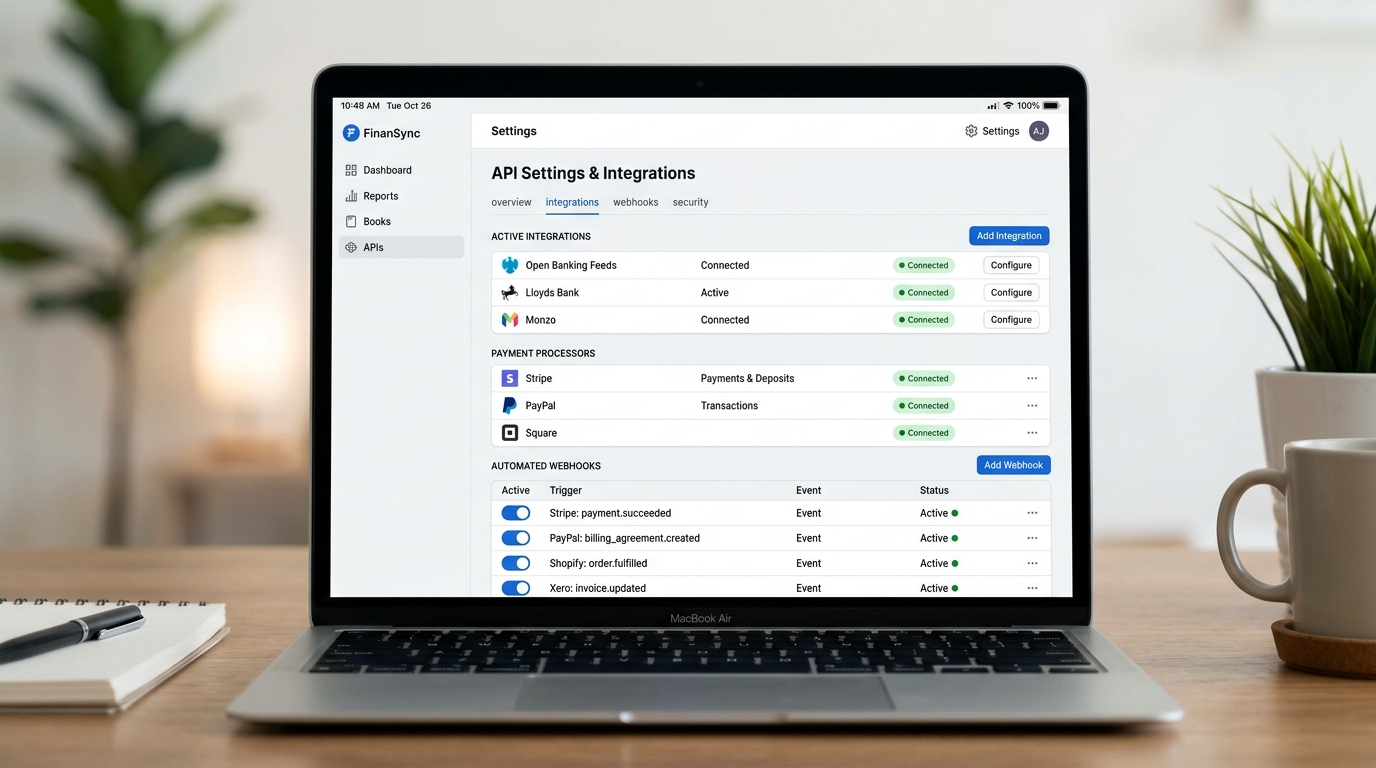
Cloud accounting software connects to commercial banks through standardized Open Banking APIs and aggregators like Plaid and Yodlee. These connections use OAuth 2.0 authorization tokens, meaning small business owners never store raw banking credentials inside the accounting platform. Bank feeds transmit structured ISO 20022 transaction payloads containing unique transaction identifiers, merchant category codes, and cleared settlement timestamps directly into the general ledger.
Below is a representative JSON webhook payload received by a cloud accounting endpoint when an external payment gateway processes a customer invoice payment:
Upon ingestion, the accounting platform automatically parses the fee deduction into merchant fee expenses while applying the gross amount against the customer's open invoice balance.
Automated Optical Character Recognition for Receipts and Invoices
Processing supplier bills and expense receipts manually consumes dozens of hours each month and introduces human transcription errors. Cloud accounting platforms solve receipt capture through optical character recognition (OCR) and machine learning ingestion engines.
When a mobile user photographs a physical paper receipt or forwards a PDF supplier invoice to a dedicated inbox address, the OCR engine parses key metadata elements automatically. The parser extracts the vendor name, invoice reference number, date, line-item totals, and sales tax figures. It then matches the extracted data against existing purchase orders or drafts an accounts payable voucher ready for one-click approval, attaching the original document image as permanent audit evidence.
Rule-Based Matching and Discrepancy Detection
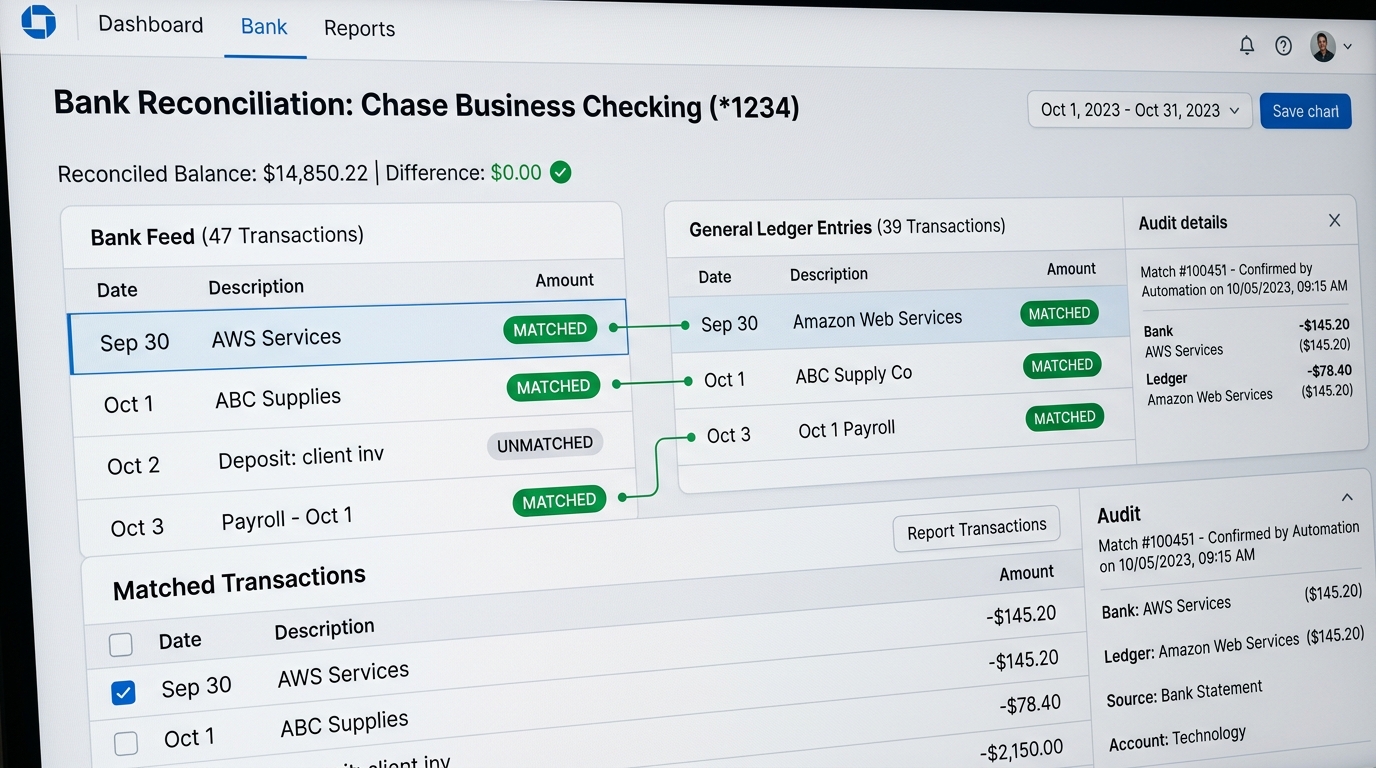
Automated reconciliation matches incoming bank feed items against pending accounts receivable and accounts payable records. System administrators can configure deterministic matching rules based on supplier naming conventions, transaction amounts, and invoice reference tokens.
When a bank deposit clears, the reconciliation engine matches the amount against open invoices, marks the customer account as paid, and posts balancing entries to the cash account and accounts receivable. If incoming data contains duplicate transaction entries from overlapping manual statements, operators can cross-reference records using techniques similar to methods used when you remove duplicates in Excel to ensure clean, singular ledger rows.
Automated transaction matching reconciles bank statements against double-entry ledgers.
Comparative Platform Analysis and Platform Selection
Platform Evaluation: Is QuickBooks the Best for Small Business?
When evaluating how to choose accounting software or determining how to choose accounting software for a company, business owners frequently ask: is QuickBooks worth it, and do I need QuickBooks for my small business? Answering whether is QuickBooks the best for small business or is QuickBooks good for small business depends on company complexity and reporting requirements.
When exploring how does QuickBooks help small businesses, key QuickBooks benefits for small business include universal CPA familiarity, deep payroll integration, and over 750 third-party app connections. Prospective buyers often ask is QuickBooks easy to use: for standard invoicing and bank feed categorization, the user interface remains accessible, though advanced inventory tracking requires higher tier subscriptions.
For businesses seeking an all in one software for small business or versatile business management software for small business, alternatives like Xero and Zoho Books offer competitive advantages. Operating as a unified business management system for small business, small business management software, or administration software for small business, these platforms unite customer billing, inventory, and expense logging into a single operational interface.
Platform
User Seat Model
API & Webhook Access
Double-Entry Core
Primary Operational Trade-Off
QuickBooks Online
Tiered Per Plan (1 to 25 seats)
REST API & Webhooks
Standard General Ledger
Higher subscription pricing and strict user seat limits on lower tiers.
Xero
Unlimited Users on All Plans
OAuth 2.0 REST API
Strict Double-Entry Ledger
Invoice volume caps on starter plans; expense claim add-on fees.
Zoho Books
Tiered Seats with Add-on Packs
Extensive Webhooks & APIs
Full Double-Entry Core
Best when operating inside the broader Zoho business software suite.
FreshBooks
Single User Base + Per-Seat Fee
Developer REST APIs
Simplified General Ledger
Optimized for client invoicing rather than complex inventory logistics.
Wave Accounting
Unlimited Collaborators
GraphQL API Access
Double-Entry Bookkeeping
Zero subscription fee but charges transaction fees; limited audit tooling.
Midsize Scaling: Accounting Packages for Medium Sized Businesses
As headcount and transaction velocity expand, organizations transition toward accounting software for midsize companies. Identifying the best accounting software for medium business or best accounting software for midsize business requires auditing multi-entity requirements and foreign subsidiary operations.
When evaluating accounting software for medium business, accounting software for medium sized business, accounting software for midsize business, or best accounting software for medium sized business, finance directors assess specialized accounting packages for medium sized businesses. Deploying cloud based accounting software for medium sized business ensures automated inter-company eliminations, custom approval routing, and advanced dimension tagging across departments without adding administrative headcount.
Profit and Loss Statements, Reporting Templates, and Cash Projections
Understanding the Profit and Loss Statement (P&L)
To understand financial health, executives rely on the profit and loss statement. Founders often inquire what does P and L stand for: P and L stands for profit and loss, representing the summary of revenues, costs, and expenses incurred during a specific period. When analyzing what does profit and loss mean or what is profit and loss in business, it reflects the company's net earning capacity after settling operating expenses.
Inspecting what does a profit and loss statement show and what does a profit loss statement look like reveals a clean top-to-bottom hierarchy: Gross Revenue minus Cost of Goods Sold (COGS) equals Gross Profit, minus Operating Expenses (OpEx) equals Net Operating Income. To master how to understand a profit and loss statement or how to find profit and loss, operators evaluate both percentage margins and nominal balances. When learning how to calculate profit and loss account, how to make a profit and loss, how to make profit and loss account, how to do profit and loss account, how to create profit and loss account, how to prepare a profit and loss statement, how to prepare profit and loss account, or how to make a profit loss statement, maintaining a standardized chart of accounts ensures accurate monthly reporting.
Profit and Loss Statement Template and Cash Projections
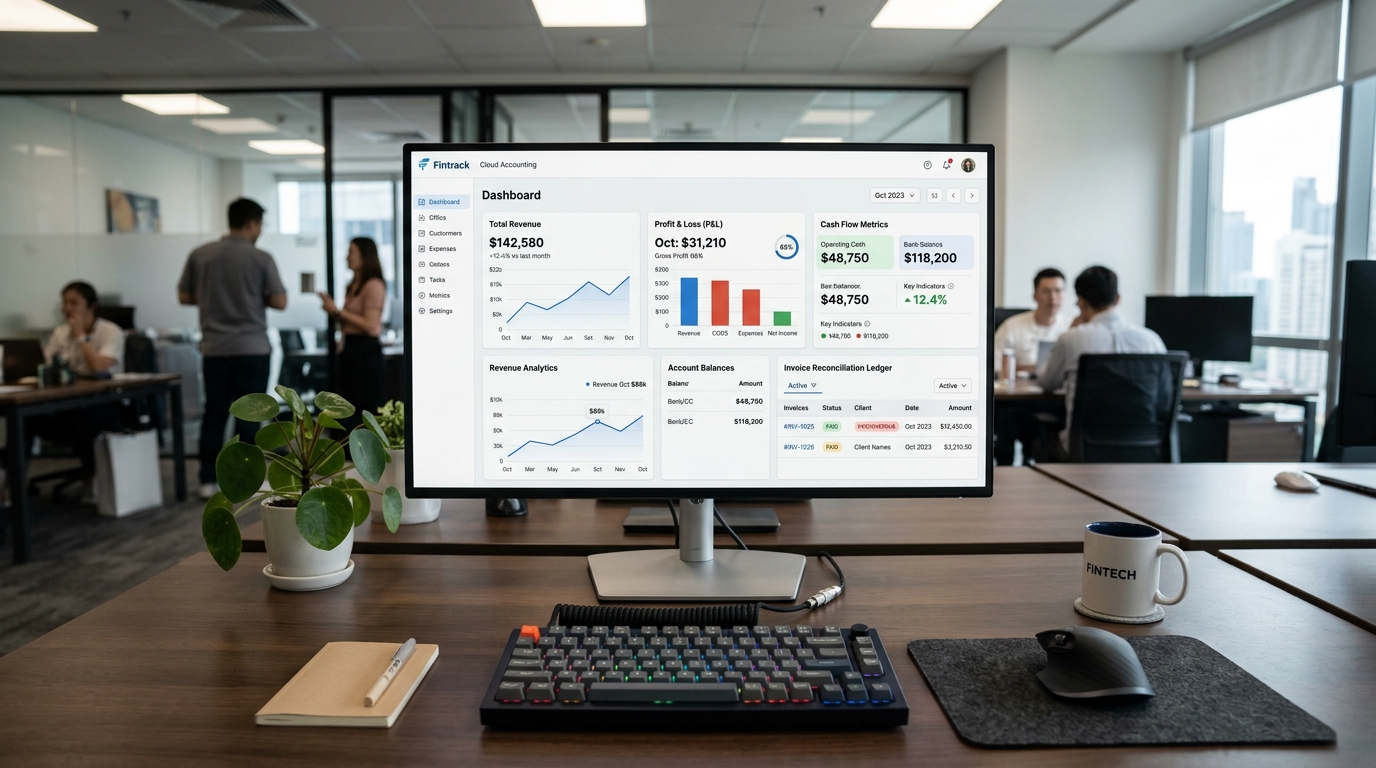
Below is an accounting profit and loss statement example demonstrating the standard profit and loss statement format. Operators can utilize this simple profit loss statement structure as a profit and loss template, profit and loss report template, profit and loss statement template, or profit and loss statement sample when configuring reporting dashboards:
================================================================================
MONTHLY PROFIT AND LOSS STATEMENT TEMPLATE
Period: October 1, 2026 to October 31, 2026
================================================================================
REVENUE
  Gross Sales Revenue                                              $142,580.00
  Less: Sales Returns & Discounts                                    ($2,450.00)
--------------------------------------------------------------------------------
NET REVENUE                                                        $140,130.00

COST OF GOODS SOLD (COGS)
  Direct Labor & Materials                          $38,200.00
  Hosting & Cloud Infrastructure                    $10,550.00
--------------------------------------------------------------------------------
TOTAL COGS                                                         ($48,750.00)
--------------------------------------------------------------------------------
GROSS PROFIT (Gross Margin: 65.2%)                                  $91,380.00

OPERATING EXPENSES (OPEX)
  Salaries & Payroll Benefits                       $42,500.00
  Marketing & Advertising                            $9,800.00
  Software Subscriptions & SaaS                      $4,120.00
  Office Rent & Utilities                            $3,750.00
--------------------------------------------------------------------------------
TOTAL OPERATING EXPENSES                                           ($60,170.00)
--------------------------------------------------------------------------------
OPERATING INCOME (EBITDA)                                           $31,210.00
  Depreciation & Amortization                       ($1,850.00)
  Interest & Tax Expense                            ($3,900.00)
--------------------------------------------------------------------------------
NET PROFIT / (NET LOSS)                                             $25,460.00
================================================================================
Whether generating a monthly profit and loss statement or exporting a profit and loss sheet into a free profit and loss template or profit and loss statement template free, linking ledger feeds ensures numbers update dynamically. Examining real-world profit and loss examples helps founders assess operational burn rates. Connecting your profit and loss and balance sheet feeds enables building a rolling cash projection using a structured cash forecast template or cash flow projection template, anticipating runway constraints 90 days in advance.
Setting Up and Managing Payroll for Small Businesses and LLCs
How Payroll Operates Inside Cloud Accounting Software
When hiring personnel, founders must master how does payroll work for a small business and how to get payroll established legally. When determining how to pay employees small business, establishing a synchronized payroll ledger avoids manual tax calculation errors. Knowing how to set up payroll for small business, how to make payroll, how to set up payroll, how do I start payroll for a small business, how to manage payroll for a small business, or how to handle payroll for small business requires systematic configuration.
To execute a structured setup payroll workflow or understand how to set up payroll for LLC entities, follow these operational milestones:
Obtain a Federal Employer Identification Number (EIN) from the IRS and register with state unemployment and Department of Revenue agencies.
Collect completed Form W-4 (Employee Withholding Certificate) and Form I-9 (Employment Eligibility Verification) for every hire.
Establish pay schedules (bi-weekly or semi-monthly) and link corporate banking checking accounts for automated direct deposit disbursement.
Configure tax withholding engines inside your cloud platform to automate Federal Income Tax, Social Security, Medicare (FICA), and state unemployment taxes.
Automate quarterly Form 941 filings and year-end Form W-2 / 1099-NEC distributions through cloud accounting integrations.
Configuring Open Banking APIs and payment gateway webhooks in cloud accounting platforms.
Security, Encryption, and Regulatory Compliance Standards
Cryptographic Standards and Data Protection
Financial ledgers contain highly sensitive corporate data, including banking coordinates, employee payroll details, and tax identification numbers. Production cloud accounting platforms enforce encryption at rest utilizing AES-256 cipher blocks. Data transmitted between client web browsers and cloud application servers requires TLS 1.3 cryptographic protocols with perfect forward secrecy.
Enterprise organizations assessing cloud infrastructure providers should inspect the vendor's SOC 1 Type II and SOC 2 Type II attestation reports. SOC 1 audits verify that the platform maintains adequate financial reporting internal controls, while SOC 2 audits validate operational security, data confidentiality, and system availability, aligning with the broader benefits of cloud computing.
Two-Factor Authentication and Session Governance
Government revenue agencies and financial authorities mandate rigorous authentication protocols for web accounting access. Platforms enforce mandatory Two-Factor Authentication (2FA) using time-based one-time passwords (TOTP) or hardware security keys (FIDO2 / WebAuthn).
Automated session timeouts terminate dormant browser connections after 15 minutes of inactivity to prevent unauthorized access on shared office workstations. IP allowlisting policies allow administrators to restrict financial ledger logins strictly to company office subnets and authorized corporate VPN gateways.
Role-Based Access Control and Separation of Duties
Internal fraud and accidental ledger corruption represent significant operational vulnerabilities for small businesses. Cloud accounting software mitigates these risks through granular Role-Based Access Control (RBAC). Administrators can define discrete permission tiers for different team members:
Standard Data Entry: Staff can draft customer invoices and log receipts without access to bank account details or historical financial statements.
Approver Role: Managers inspect and authorize purchase orders or payments exceeding specific financial thresholds.
External Accountant: Professional advisors gain read and write permissions to reconcile balance sheets and post adjusting tax entries without administrative ownership of the cloud account.
Read-Only Auditor: External auditors inspect reports and transaction histories without the ability to modify records.
Data Migration and Chart of Accounts Configuration
Establishing the Chart of Accounts
The Chart of Accounts (COA) serves as the index structure for all financial activity within a business. A standard setup organizes ledger categories into standard numerical ranges: 1000s for Assets, 2000s for Liabilities, 3000s for Equity, 4000s for Revenue, and 5000s through 8000s for Operational Expenses.
Before migrating active operations to the cloud, finance leads must audit and streamline account codes. Consolidating redundant categories simplifies monthly reporting and prevents team members from misclassifying ordinary overhead expenses into incorrect tax deduction buckets.
Executing Clean Migration and Opening Balances
Migrating from spreadsheets or legacy desktop applications requires a disciplined cutoff protocol. Attempting to transfer ten years of raw, unverified historical transactions often introduces data errors into the new system. The standard operational procedure involves establishing a firm cutoff date, typically the end of a fiscal quarter or fiscal year:
Export vendor profiles, customer directories, and product inventory catalogs into clean CSV formats.
Finalize and reconcile all transactions in the legacy system up to the cutoff timestamp.
Enter the confirmed closing trial balance into the cloud platform as opening journal balances.
Import outstanding accounts receivable invoices and unpaid accounts payable bills individually so settlement tracking remains intact.
Connect Open Banking API feeds starting strictly from the day after the cutoff date to prevent duplicate transaction entries.
Troubleshooting Sync Failures and Common Ledger Pitfalls
Resolving Duplicate Bank Feed Transactions
The most common data error in cloud accounting occurs when an operator manually uploads a bank statement CSV and subsequently connects an automated Open Banking feed covering the same date perimeter. This results in duplicate transactions that double reported revenue or artificially inflate recorded expenses.
To resolve this discrepancy, inspect the bank feed audit register and isolate duplicated records by comparing transaction reference IDs. Void or exclude the manual imports while keeping the active API feed intact. When sorting through high-volume transaction records to spot discrepancies, spreadsheet operators can apply structured range sorting techniques explained in our tutorial on how to sort in Google Sheets.
Diagnosing Foreign Currency and Rounding Discrepancies
Companies conducting cross-border commerce frequently encounter reconciliation gaps caused by foreign currency fluctuations. If a small business invoices an international client in euros but receives settlement in US dollars, the exact exchange rate applied by the payment processor may differ slightly from the daily market rate pulled by the cloud accounting system.
Cloud platforms manage these variances through dedicated Unrealized and Realized Foreign Exchange Gain/Loss accounts. Operators must verify that automated currency revaluation runs at the end of each reporting period to ensure balance sheet valuations reflect accurate local currency equivalents.
Handling Automated Tax Engine Nexus and Rate Changes
E-commerce sellers and remote service providers face complex sales tax compliance rules across multiple states and international jurisdictions. Cloud accounting platforms solve this challenge through API connections with automated tax engines like Avalara and TaxJar. When an invoice generates, the platform computes local sales tax dynamically based on the customer's delivery postal code.
When tax calculation failures occur, they usually stem from misconfigured product taxability codes or missing physical/economic nexus triggers. Finance teams should establish quarterly audits of tax registration states to prevent accumulating uncollected tax liabilities.
Scaling Beyond Small Business to Mid-Market ERP Systems
Recognizing Architectural Growth Boundaries
While entry-level cloud accounting software handles several million dollars in annual turnover effectively, fast-growing companies eventually encounter structural throughput limits. Common signs that a business has outgrown standard small business accounting platforms include:
Multi-Entity Consolidation: Managing five distinct corporate subsidiaries requires automated inter-company transaction eliminations and unified balance sheet reporting that basic platforms cannot execute natively.
Complex Revenue Recognition: Subscription-based SaaS companies requiring deferred revenue schedules under ASC 606 or IFRS 15 require specialized billing subledgers.
Transaction Volume Caps: High-frequency e-commerce stores processing tens of thousands of individual daily orders encounter database throttling and slow report generation speeds.
Planning the ERP Transition Path
When a growing enterprise reaches these architectural thresholds, migrating from small business software to an enterprise resource planning (ERP) system like Oracle NetSuite, Microsoft Dynamics 365 Business Central, or Acumatica becomes necessary. Maintaining clean, standardized chart of accounts structures and well-documented API data models during early growth stages ensures that this eventual ERP transition executes smoothly without business disruption.
Frequently Asked Questions
Cloud accounting hosts double-entry ledgers on distributed multi-tenant servers accessible from web browsers, featuring automated Open Banking API feeds, automatic backups, and live multi-user collaboration rather than static desktop files.
Evan Mitchell• Cloud Infrastructure Specialist & Systems Administrator3+ Years Industry Experience
Systems administrator with 3+ years managing enterprise Linux servers, AWS EC2 instances, and Docker containers. Evan focuses on practical bash scripting and secure network configurations.